

AI summary
Summary of article:
The new MacBook Pro includes a touch screen and PROLED XDR display, allowing photographers and fashion designers to retouch, draw and 3D models in a more intuitive way, shortening the distance from inspiration to finished product.
The highly topical new MacBook Pro not only adds screen touch functionality for the first time, but is also equipped with a PROLED XDR display using Tandem OLED technology. For creators who in the past relied heavily on touch trackpads, external drawing tablets, and professional color correction screens, this change is equivalent to a new way of operating, giving users more diverse and intuitive interactive options when viewing colors, editing images, and creating designs.
Jeremy Z. Qin, a fashion photographer active in Shanghai and New York, and Susan Fang, a cutting-edge fashion designer living in London, after experiencing the MacBook Pro equipped with PROLED
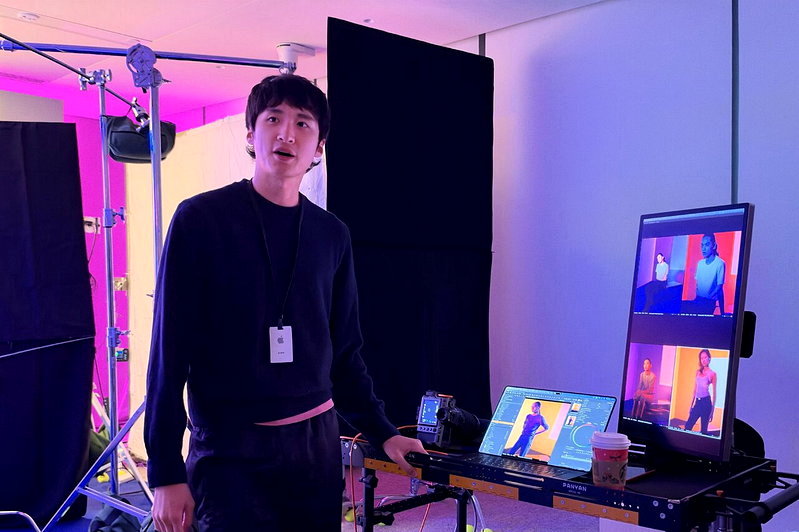
Jeremy said that traditional studio photography usually requires connected shooting through Capture One software. When processing high-pixel and large image files, this is a big test for computer performance. Touch MacBook Pro brings a new experience to subsequent image editing and studio shooting on-site operations. Take light and shadow adjustments as an example. Previously, you had to click and operate with a mouse or touch trackpad. You can now drag the light curve (curve) directly on the screen with your finger to make detailed fine-tuning more intuitively.
Combined with the AI mask function applied on the machine, the system can automatically identify human subjects and specific backgrounds, and subsequently apply adjusted color settings to the photos taken, thereby reducing repeated editing time. Jeremy believes that the touch screen satisfies the creators’ “intuitive controls for the first time.” Combined with the accurate color reproduction capabilities and powerful computing performance of the PROLED XDR display, it can maintain smooth work efficiency even when processing high-pixel image files.
In addition to professional photo editing, touch operation also makes daily control over the shooting scene more convenient. For example, while music is playing, you can tap the screen to switch AirPlay audio output without entering cumbersome menu operations, allowing photographers to instantly understand the atmosphere of the scene.
Fashion designer Susan Fang shared that her creations often draw inspiration from nature, computational geometry, and 3D printing technology. Touch makes the MacBook Pro design process more intuitive. In the past, when using Illustrator to create designs or process 3D printed lace details, it was often necessary to slowly outline them with the mouse; Now, you can draw petal patterns by hand directly on the touch screen and precisely connect the lines, turning inspiration into designs faster.
In the drawing software developed by the team, users can create gradient lines with watercolor textures by sliding their fingers across the screen, adjusting the stroke and mixing colors at any time, while maintaining the characteristics of vector graphics. After entering the 3D modeling stage, you can directly use gestures to rotate the 3D object, pinch and drag the model, adjust the object thickness and geometric cross-section, and see the modification effects in real time, making the design process closer to actual construction.
Suzanne Fang’s husband, Aurelio De Jonghe, who is also the brand’s design director of shoes and accessories, also pointed out that in the past when using different design and 3D animation software such as Houdini, Blender and ZBrush, it was often necessary to be familiar with their corresponding shortcut key combinations, which increased the learning cost of cross-software operations. Screen touch provides a more intuitive and consistent gesture operation method, reducing the time it takes for users to re-familiarize themselves with operations when switching between different devices.
To allow more people to get started quickly and create professional, organic and abstract design work, Aurelio has also developed a simple and intuitive 3D modeling app. This software was originally designed for the iPad touch interface. After learning that the new MacBook Pro will support screen touch, they immediately converted the original iPad version into a Mac version and further adjusted the interface and operation methods so that users can directly do touch modeling through the MacBook Pro screen.
From photographers’ image editing to fashion designers’ graphic drawing and 3D modeling, the changes brought by touch screens not only provide an additional way of operation, but also allow creators to interact with digital content with an intuition closer to real hand-drawing and sculpting. With the color performance of the PROLED
Summary FAQ
-
Jeremy Z. Kin said that touch screens allow them to draw curves directly on the screen to adjust lighting and shadows, replacing mouse and touch trackpad operations. With AI masks and high-performance processing, it can also reduce repeated editing times.
-
She can draw petal patterns by hand and add lines directly on the screen, and create watercolor texture gradients in her drawing software using her fingers. After entering the 3D stage, she can also use gestures to rotate, pinch, and drag the model.
-
Aurelio de Jonghe pointed out that touch brings consistent and intuitive gesture operation, reducing the cost of re-familiarizing yourself with shortcut keys when switching between Houdini, Blender, ZBrush and other software, and also makes it easier to port iPad versions of 3D modeling apps to the Mac.